Monitoring
Automate health checks to ensure your services are running as expected.
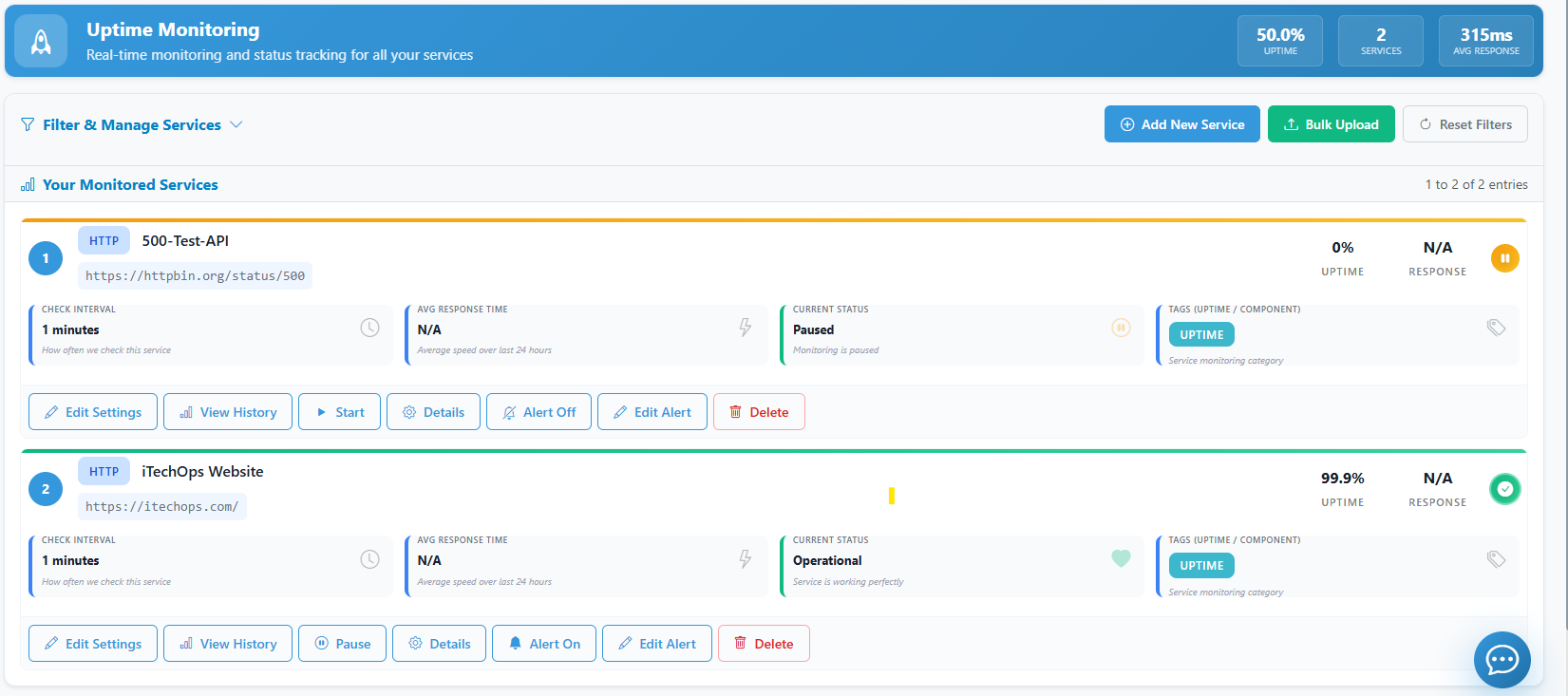
1. Adding a Monitor
- Navigate to Monitors.
- Click Add Monitor.
- Choose a monitor type: HTTP, Ping, or TCP.
- Enter the URL or IP Address to monitor.
- Configure the Check Interval (e.g., every 5 minutes).
- Set the Timeout and Retry thresholds.
2. Updating Monitor Settings
To adjust a monitor after it has been created:
- Click Settings on the specific monitor.
- Update the URL, interval, or threshold.
- Save changes. The monitor will begin using the new settings on the next check.
3. Changing Alert Rules
Define who gets notified when a monitor fails.
- Go to the Alerts tab within a monitor.
- Add or remove notification groups (e.g., "Engineering Team").
- Choose the failure threshold (e.g., "Alert after 2 consecutive failures").
4. Deleting a Monitor
- Select the monitor from the list.
- Click Delete Monitor.
- Data history for this monitor will be permanently removed.